Here is the code for running the BMP180 pressure sensor:
>>> import Adafruit_BMP.BMP085 as BMP085
>>> sensor = BMP085.BMP085()
>>> sensor.read_temperature()
24.3
>>> sensor.read_pressure()
102543L
>>> print 'Pressure = {0:0.2f} Pa'.format(sensor.read_pressure())
Pressure = 102543.00 Pa
>>> sensor.read_altitude()
-99.8422490470797
>>> sensor.read_sealevel_pressure()
102542.0
Showing posts with label Code. Show all posts
Showing posts with label Code. Show all posts
Saturday, January 31, 2015

Finding time in Python
In order to properly record the data, I need a timestamp. I found a few minutes this afternoon where I could research it a little. I found two methods:
Using datetime:
>>> from datetime import datetime
>>> current_time = datetime.now()
>>> current_time
datetime.datetime(2015, 1, 31, 15, 35, 14, 21154)
>>> from datetime import datetime
>>> current_time = datetime.now()
>>> current_time
datetime.datetime(2015, 1, 31, 15, 35, 14, 21154)
Simple. But there is one slight problem. I'm sure there's a way to do it, but how do you extract just the day, hour, our minute, without any of the other variables?
I would research this more, and probably will, except that I found another solution.
Using time:
>>> from time import strftime,gmtime
>>> strftime("%Y-%m-%d %H:%M:%S", gmtime())
'2015-01-31 20:41:22'
>>> strftime("%Y-%m-%d %H:%M:%S")
'2015-01-31 15:41:26'
>>> from time import strftime,gmtime
>>> strftime("%Y-%m-%d %H:%M:%S", gmtime())
'2015-01-31 20:41:22'
>>> strftime("%Y-%m-%d %H:%M:%S")
'2015-01-31 15:41:26'
In my opinion, this second option is easier. Yes, you need to know date and time codes and formats for Linux, but I've dealt with those for a while, so it shouldn't be an issue for me. For a reference, the codes are found by looking up "man date" in a terminal window in Linux.
In addition to already knowing the date codes, this method also make it possible to set my own preferences in how each timestamp is recorded.
Tuesday, December 23, 2014
Temperature Sensor
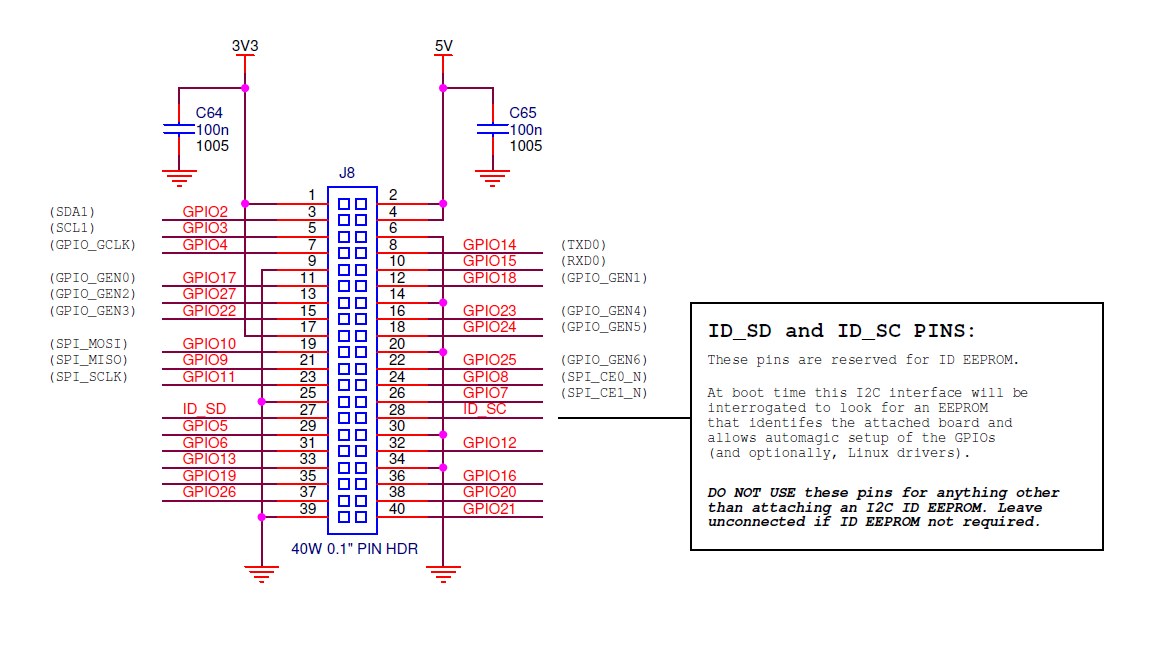
Today's project was playing with the temperature sensor. In order to get it to work, I needed to learn about GPIOs for the Raspberry Pi. I only delved in enough to get the basics. But once I had those, the rest came so easily. For reference, here is the picture showing the placement of the pins in a RPi-B+:

The temperature/humidity sensor I am using is a DHT11. <http://www.amazon.com/gp/product/B00BXWUWRA/ref=oh_aui_detailpage_o01_s00?ie=UTF8&psc=1>
The basic directions I followed were on the Adafruit website:
Here are the python commands I used to get it to work (python has to be run using sudo, since we need su access to use the GPIOs).
*********************************
>>> import Adafruit_DHT
>>> sensor = Adafruit_DHT.DHT11
>>> pin = 4
>>> humidity, temperature = Adafruit_DHT.read_retry(sensor, pin)
>>> humidity
46.0
>>> temperature
24.0
>>>
*********************************
I currently have it set up using the breadboard. However, I got a reading earlier using connections directly with the GPIO in the Pi. That's not working now, however. It's something I'll have to look at later.
It looks like I can run this program anywhere as long as the file "Adafruit_DHT.py" is in the same directory (obviously, since the file needs to be imported).
I have seen some reviews showing preferences to the DHT22, so if I ever need to get a second temperature sensor, I can consider that one.
The temperature/humidity sensor I am using is a DHT11. <http://www.amazon.com/gp/product/B00BXWUWRA/ref=oh_aui_detailpage_o01_s00?ie=UTF8&psc=1>
The basic directions I followed were on the Adafruit website:
- Wiring: <https://learn.adafruit.com/dht-humidity-sensing-on-raspberry-pi-with-gdocs-logging/wiring>
- Software: <https://learn.adafruit.com/dht-humidity-sensing-on-raspberry-pi-with-gdocs-logging/software-install-updated>
Here are the python commands I used to get it to work (python has to be run using sudo, since we need su access to use the GPIOs).
*********************************
>>> import Adafruit_DHT
>>> sensor = Adafruit_DHT.DHT11
>>> pin = 4
>>> humidity, temperature = Adafruit_DHT.read_retry(sensor, pin)
>>> humidity
46.0
>>> temperature
24.0
>>>
*********************************
I currently have it set up using the breadboard. However, I got a reading earlier using connections directly with the GPIO in the Pi. That's not working now, however. It's something I'll have to look at later.
It looks like I can run this program anywhere as long as the file "Adafruit_DHT.py" is in the same directory (obviously, since the file needs to be imported).
I have seen some reviews showing preferences to the DHT22, so if I ever need to get a second temperature sensor, I can consider that one.
Camera for the Weather Balloon
I got the camera on my Raspberry Pi working. It was rather simple. Using Raspbian, I just had to enable the camera (run sudo raspi-config), then figure out the code. Here is a simple program I wrote, just to record the commands for the camera:
*******************
import time
import picamera
camera = picamera.PiCamera()
# Use to view current picture from camera on screen connected to
# the Raspberry Pi. Not for use with ssh.
#camera.start_preview()
# Use when ribbon of camera is on the top of the camera. Make 'False'
# if the ribbon is on the bottom of the camera.
camera.vflip = True
camera.hflip = True
camera.brightness = 60
# Capture a single image
camera.capture('image.jpg')
# Capture a video
camera.start_recording('video3.h264')
time.sleep(5) # Length of video
camera.stop_recording()
*******************
*******************
import time
import picamera
camera = picamera.PiCamera()
# Use to view current picture from camera on screen connected to
# the Raspberry Pi. Not for use with ssh.
#camera.start_preview()
# Use when ribbon of camera is on the top of the camera. Make 'False'
# if the ribbon is on the bottom of the camera.
camera.vflip = True
camera.hflip = True
camera.brightness = 60
# Capture a single image
camera.capture('image.jpg')
# Capture a video
camera.start_recording('video3.h264')
time.sleep(5) # Length of video
camera.stop_recording()
*******************
Subscribe to:
Posts (Atom)